
About Penguin ePulse
About Penguin ePulse.
Closer to your audience.
Penguin ePulse connects social content, customer conversations, analytics and market intelligence so your team can make its next decision with the right context.
Our purpose
Make social activity useful to the whole team.
A customer question can improve a post. A campaign report can reveal what to investigate next. A market signal can change the message you planned to publish. The value comes from connecting those moments.
Penguin ePulse is web-based social media management software that brings content planning, connected-account conversations, analytics and source-linked market research into a shared workspace. Our purpose is to help marketing teams move from scattered activity to informed action.
For the person writing the next post, that means keeping the audience question in view. For the person handling a conversation, it means reviewing the original context. For a team lead, it means understanding the account, period and evidence behind a recommendation.
Work that connects
One question can lead
to a better next step.
Give content a clear starting point.
Bring drafts, media inventory and calendar planning together. Turn the questions your audience asks into content your team can prepare, review and publish through supported channels.
Explore content workflows →Keep the customer context close.
Review connected-account conversations in ORM Center. Read the original thread, understand the request and decide the next response with the account and permissions in view.
Explore social inbox and ORM →Make reporting useful to a decision.
Review social media analytics with account context, date ranges and metric definitions. Use the review to choose what to repeat, what to investigate and what to change next.
Explore analytics and reporting →Bring evidence into market intelligence.
Use Market Listening and Data Intelligence research to investigate a brand, campaign or competitor question. Review scoped findings alongside their source links before acting on a summary.
Explore market listening →Ask with your workspace in mind.
AI Studio helps you work with content and information through natural-language requests. Keep the task, account and period clear, then review the response and available actions.
Explore AI Studio →Carry the context into the handoff.
Start with a real task and follow it across the product. A useful handoff should make the source, status and next decision understandable to the teammate continuing the work.
See the connected platform →Available actions depend on connected accounts, channel permissions, configured sources and provider availability.
Inside the workspace
The work behind the next decision.
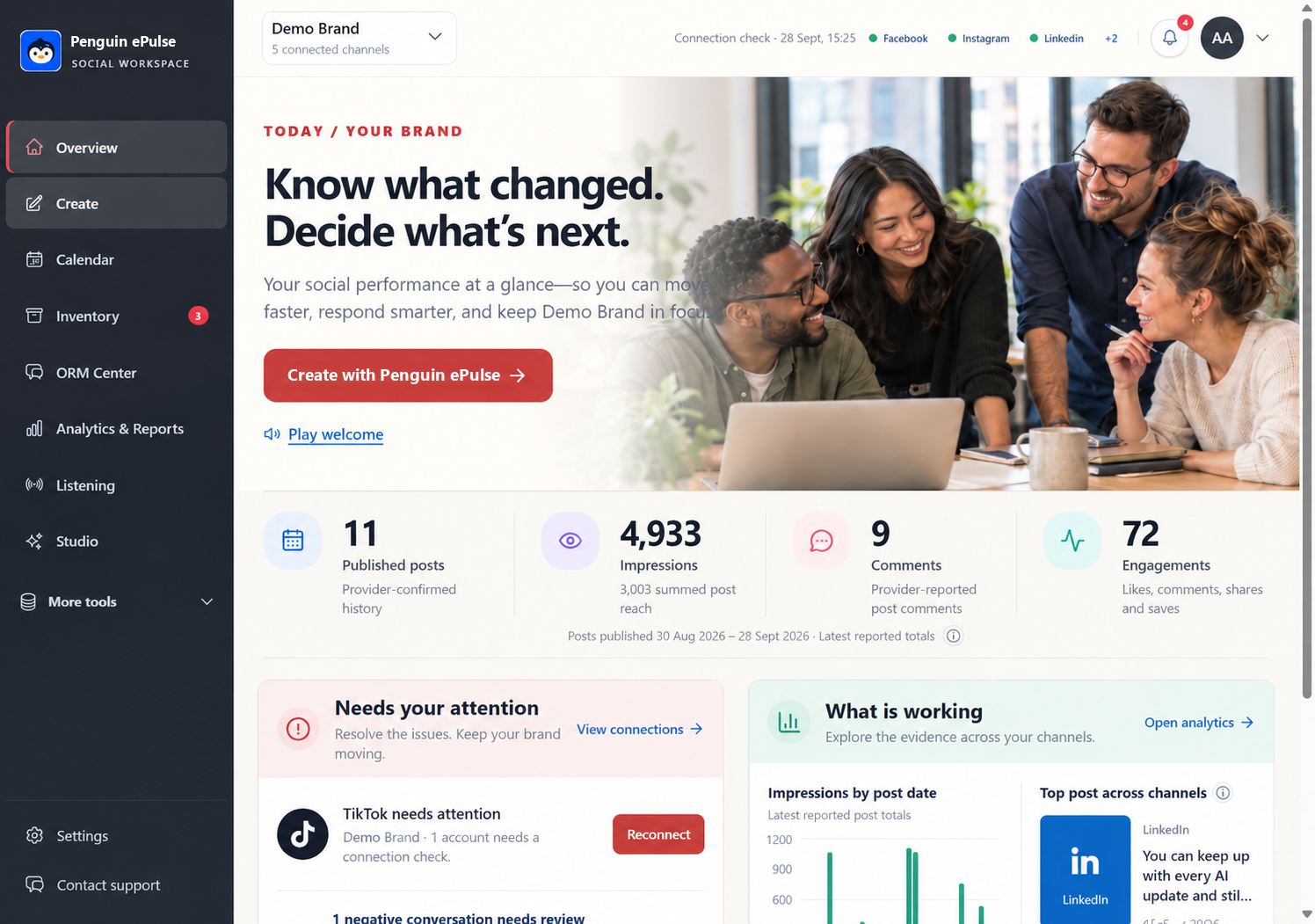
Content, conversations and reporting belong in the same discussion. Explore the actual product view below, then bring a task from your own team to the demo.
A practical example
From a recurring question
to a clearer answer.
Imagine a retail team noticing repeated questions about a product. The conversation review helps the team understand what people are asking. A scoped Market Listening brief can add relevant public research. The content team can use that evidence to prepare an explanation, and analytics can support the review afterward.
The useful outcome is a decision the team can explain: which question deserves a response, which message needs clarification and what evidence will inform the next review. This is an illustrative workflow, not a reported customer result.
Explore product feedback listeningWhat guides us
Useful work. Clear evidence.
People in control.
Start with the team's question.
A dashboard should help someone decide what to do next. We organize the product around the work of preparing content, handling conversations, reviewing performance and researching a market question.
Keep the evidence visible.
A number needs an account and a period. A research finding needs a source. Keeping those details close makes a recommendation easier to understand, challenge and use.
Keep judgment with the team.
AI can help organize information and prepare work. People still need to review important findings and proposed actions. Supported tools, permissions and confirmation steps define what can happen next.
Built around your work
Different industries.
Practical questions.
A healthcare service question, a pharmaceutical information review and an agency campaign report each need different context. Explore 24 distinct use cases across six industries, with a workflow, feature mapping, review metrics and clearly labeled examples.
- Healthcare · Patient service conversations, education, feedback research and campaign review.
- Pharma · Public information content, conversation review, source-linked research and reporting.
- IT · Technical content, buyer and competitor research, conversations and campaign analysis.
- Automobile · Launch content, customer questions, market research and campaign review.
- Retail · Product content, customer conversations, product feedback listening and performance review.
- Agency · Client content, conversation handling, market research and reporting handoffs.
Use cases describe practical applications. They are not named customer stories, measured customer outcomes or claims of industry certification.
Find your industry workflowLearn, then apply
Good decisions need
more than a feature list.
Our resource library includes 100 practical guides alongside the industry use cases. Explore social listening, online reputation management, social media analytics and reporting with examples, definitions and source references you can use in your team's evaluation.
Product identity
Questions about Penguin ePulse.
What is the official Penguin ePulse website?
The official website for the Penguin ePulse social media workspace is penguinepulse.com. The product name is written Penguin ePulse, with a lowercase e before Pulse. The domain and existing page addresses remain the same.
Has Penguine Pulse been renamed to Penguin ePulse?
Yes. Penguin ePulse is the new name for the social media workspace previously called Penguine Pulse. The official domain remains penguinepulse.com. The rename does not create a second platform or a new website address.
Are Penguin ePulse and Pulse Penguin the same product?
No. Penguin ePulse at penguinepulse.com is a social media workspace for content, connected-account conversations, analytics and market research. Pulse Penguin’s official website describes a separate AI business operations and delegation platform. The two product names should not be used interchangeably.
Which Penguin ePulse workflows can I explore?
Explore content planning and publishing, social inbox and reputation workflows, analytics and reporting, market listening and Data Intelligence research, and AI Studio. Available actions depend on channel permissions, configured sources and provider availability. A demo can establish the scope for your team.
Who is Penguin ePulse built for?
Penguin ePulse is built for brand marketing teams, agencies and organizations that need to connect social content, customer conversations, analytics and market research. Explore four practical workflows for each of six industries: Healthcare, Pharma, IT, Automobile, Retail and Agency. These are illustrative applications, not customer endorsements.
What should I bring to a Penguin ePulse demo?
Bring one content task, one representative customer question and one reporting or market research question. The demo can show where each task starts, which account or source is involved, what your team reviews and what the next teammate needs to continue. Channel permissions and source availability determine the available actions.
Bring one real task.
See the work connect.
A content brief, a customer question or a reporting challenge. Bring the task your team needs to solve, and use the demo to evaluate the workflow.
Book your product walkthrough ↗