Penguin ePulseBook a demo

The workflow comparison

Penguin ePulse
& Sprout Social.

Bring the campaign and its context into the same decision.

Reviewed October 9, 2026 · Official sources linked throughout

Content and schedulingConnected conversationsAnalytics and reportsSource-linked researchStudio assistance

The practical difference

Choose the workflow.
Then choose the platform.

Sprout Social documents mature publishing, customer care and reporting workflows. Penguin ePulse brings those daily work surfaces together with scoped, source-linked market research. Evaluate the complete workflow and the exact plan or add-on needed for each requirement.

Inside Penguin ePulse

Content.
Conversations.
Context.

Move from a draft to a customer question to the evidence behind your next decision. Keep the work in one social workspace.

See your workflow
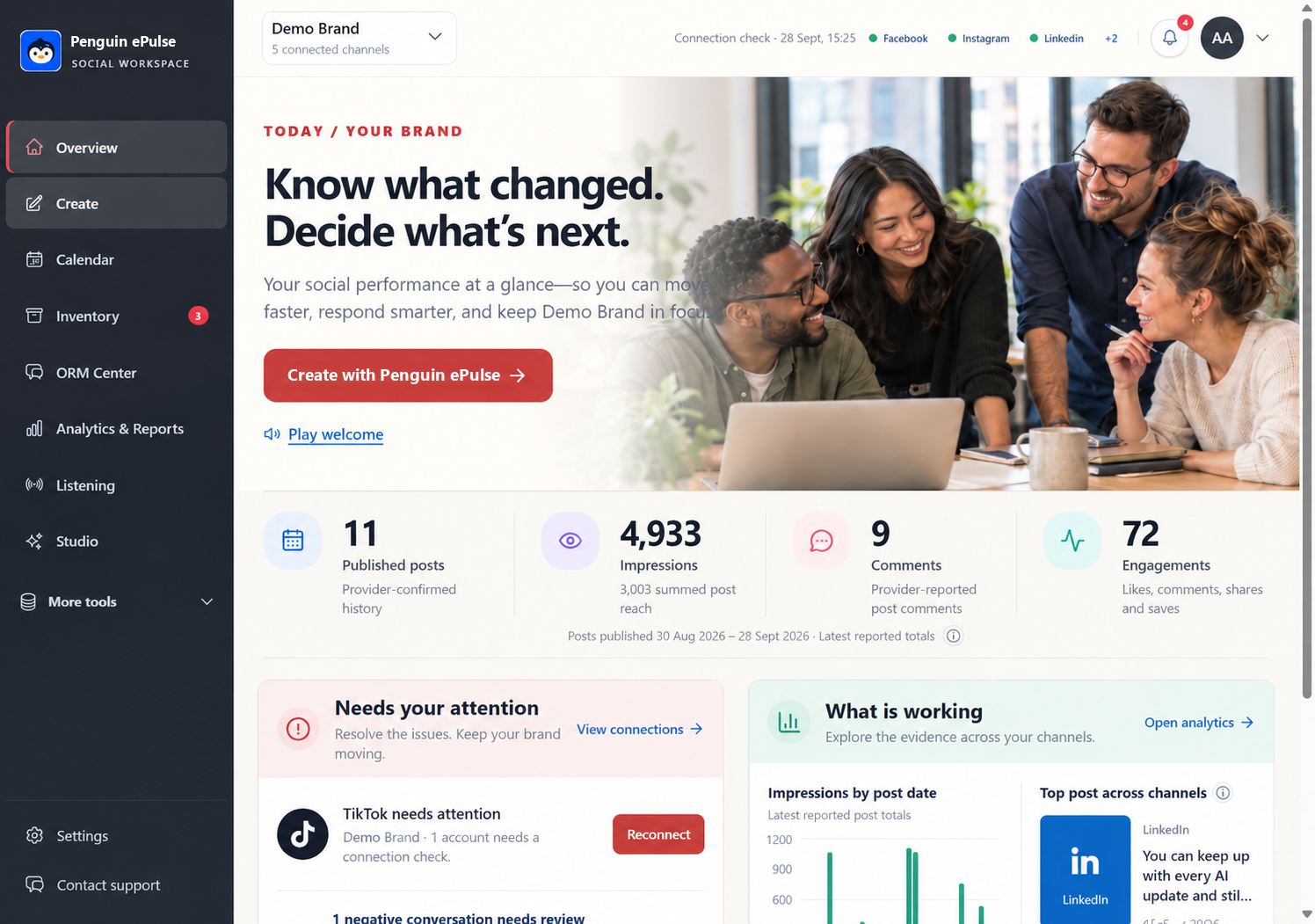
Penguin ePulse example workspace with content, conversations and performance context
Actual product view · Example workspace data

A closer look at our approach

Clear context.
Confident next steps.

01

Start with the question.

Define the topic, dates and source scope before collecting research. Make the brief fit the decision.

Explore Market Listening →
02

Keep the evidence close.

Follow direct source links behind findings. Review what the collection includes and what it leaves out.

See the research workflow →
03

Stay in control.

Studio works within available tools, permissions and action confirmations. Review the proposed next step.

Meet Studio →

Bring your campaign, your customer conversations and your research question into the same working context.

Where the decision gets specific

Look closer at the daily work.

Publishing is one part of the decision.

Sprout documents a shared calendar, Smart Inbox and account/post reports. Professional adds capabilities such as an asset library and multiple-approver workflows. In Penguin ePulse, follow the same content through Create, Calendar, ORM Center and Analytics & Reports, validating channel-specific actions.

Separate account analytics from listening.

Sprout’s Listening and Premium Analytics are individual add-ons from Standard upward. Penguin ePulse Market Listening offers scoped briefs with source links; it does not claim universal mention coverage. Ask for the same research sample and distinguish account metrics from broader public-conversation findings.

Use AI with the working evidence in view.

Sprout includes Trellis with credit limits, and additional AI assistance varies by plan. Penguin ePulse Studio works with the available workspace tools and permissions. Test a question your analyst would actually ask, then inspect the supporting data and confirmation steps.

Choose Penguin ePulse for a connected, evidence-led social workspace. Compare the Sprout subscription and listening/analytics add-ons required for your team.

35 criteria · 2 platforms

Your daily workflow, connected.

35 core workflows across content, conversations, listening, analytics and AI. Select a symbol for its source.

✓ Supported workflow— Plan / scope varies✕ Core workflow not listed

Showing all 35 comparison criteria.

CapabilityPenguin ePulseContent · conversations · intelligenceSprout SocialPublishing, care and reporting
Publishing
Draft creationKeep the intended account and version attached to the content.

Create workspace

Draft and publishing workflow

Content calendarA shared view should distinguish planned work from completed posts.

Calendar with content states

Cross-network calendar

Post schedulingPlan a supported connected-account post for a chosen date and time.

Scheduled publishing for supported connections

Scheduling across connected networks

Media libraryCheck storage, version ownership and reuse of approved assets.

Inventory workspace

Asset library: Professional

Campaign content planningOrganize several campaign drafts and their calendar slots.

Multi-draft campaign and calendar planning

Campaign planning and shared calendar

Timezone-aware schedulingKeep scheduled work aligned with the team’s selected timezone.

Brand-timezone calendar scheduling

Scheduled publishing and calendar

Care & ORM
Unified conversation inboxReview a real thread, its account and the next action together.

Connected-account ORM Center

Smart Inbox

Public comments and DMsRead and respond through supported connected-account actions.

Connected comments and private-message workflows

Comments, messages and mentions

Conversation search and filtersFind the messages relevant to an account, date or issue.

Account, date, sentiment and risk filters

Smart Inbox filters

Reply drafting assistancePrepare a response for human review before sending.

Contextual reply starters with human review

Enhance Reply; Advanced

Conversation thread contextKeep a customer message connected to its original conversation.

Original post and conversation context

Smart Inbox conversation context

Conversation and sentiment reportingBring collected conversation evidence into a useful report.

ORM reports with sentiment and source evidence

Engagement and care reporting

Listening
Brand and keyword monitoringDefine the query and make irrelevant results easy to identify.

Scoped market briefs

Keywords; broader Listening add-on

Public web researchSource access defines what a finding can reasonably represent.

Public web and search signals

Confirm Listening source set

Sentiment analysisReview classified positive, neutral and negative conversation evidence.

Sentiment classification with evidence review

Listening add-on; inbox Advanced

Topic and theme discoveryA useful theme should lead back to the underlying evidence.

Research findings with links

Smart Categories: Listening

Risk and negative-mention reviewReview negative sentiment and flagged issues before responding.

Negative sentiment and high-risk review

Sentiment and conversation review

Competitor conversation researchCompare matched queries and time periods rather than raw totals.

Matched-scope research briefs

Broader research: Listening add-on

Research-to-content workflowUse a researched topic to inform the next content decision.

Market research alongside Create and Studio

Listening insights to publishing

Analytics
Owned-account performanceKeep account identity and metric definitions visible.

Overview and Analytics & Reports

Profile Performance reporting

Individual post performanceInspect results for a specific published post.

Post-level metrics and conversation evidence

Post Performance reporting

Paid and organic separationReview advertising and organic evidence in the appropriate reporting view.

Separate paid and organic reporting views

Paid reports: Professional

Period-over-period comparisonCompare equivalent metrics across selected reporting periods.

Date-window and reporting-period comparisons

Performance-period comparisons

Report exportsTake the loaded report evidence into a usable file.

CSV and JSON report exports

Shareable reports; depth varies

Report filters and drill-downsMove from the summary to the account, post or conversation detail.

Date, platform, source and sentiment drill-downs

Content and message-type filters

AI & evidence
Content assistanceA generated draft still needs the correct brand and account context.

Workspace Studio assistant

Enhance Post: Professional

Conversational assistantEvaluate how an answer uses your data and what it cannot access.

Natural-language Studio

Trellis; monthly credit limits

AI analysis and summariesRequire enough evidence to challenge a confident-sounding answer.

Scoped assistant responses

Trellis analysis

Source evidence reviewTrace an important conclusion to its original context.

Direct research source links

Listening findings; inspect outputs

Control over AI actionsAsk to see the confirmation step before a consequential action.

Permissions and action confirmations

Configurable publishing approvals

Workspace & coverage
Connected-account selectionChoose the social account attached to the work.

Explicit connected-account selection

Connected profile selection

Brand and project organizationKeep the active brand or research project clear.

Brand-specific working context

Teams, brands and profile groups

Source and coverage labelsUnderstand which collection supports the finding.

Provider, source and evidence labels

Listening collection scope

Historical date filtersReview the stored evidence available within the chosen dates.

Stored-history and date-range review

Date-range reporting

Channel-specific viewsInspect channel-specific evidence without implying identical network access.

Platform-specific account and reporting views

Network and profile reports

The buying conversation

Compare the complete setup.

Prices below are published USD rates reviewed October 9, 2026; annual monthly equivalents require annual billing. Features, taxes, services and collection limits can change the total. Confirm a current quote.

Sprout Social

From $79

Annual-billing per-seat monthly rates: Essentials $79, Standard $199, Professional $299, Advanced $399; Enterprise custom. Essentials is $99 on monthly billing.

View pricing / product source

Bring the same requirements to every quote.

Specify users, social profiles, post formats, inbox sources, approval steps, listening queries, monthly volume, historical coverage, exports and onboarding. A seat-based publishing plan and a mention-based monitoring package are different purchases.

If you decide to switch

Plan a clean handover.

Keep a usable record.

Export the reports and content you need before ending a subscription. Confirm retention and export permissions. Historical metrics and listening archives may not transfer between providers.

Reconnect deliberately.

Reconnect accounts with the correct owner and permissions. Review post formats, drafts, scheduled items and time zones. Do not assume credentials or scheduled posts migrate automatically.

Rebuild the rules that matter.

Recreate listening queries, source scope, inbox ownership and approval paths. Ask the team which parts can be imported and which need manual configuration.

Validate one complete workflow.

Run a representative campaign before the handover: prepare a post, review a conversation, check a report and trace a research finding. Agree onboarding help and any fees in writing.

Before you decide

A few useful answers.

What is the difference between social media management and social listening?

Social media management organizes content, connected-account conversations and performance. Social listening examines a defined collection of conversations or market signals. Source coverage, permissions and historical access determine what each workflow can support.

Who is Penguin ePulse built for?

Penguin ePulse brings content creation, scheduling, connected conversations, analytics and source-linked research into a shared working context. Its industry use cases cover healthcare, pharma, IT, automobile, retail and agency teams.

Does Brand24 include a publishing calendar and customer-care inbox?

The reviewed Brand24 material focuses on monitoring, mentions, sentiment, alerts and intelligence. A publisher and a customer-care inbox are not listed as core workflows in those sources. Confirm current capabilities directly with Brand24.

Are Sprout Social Listening and Premium Analytics included in every plan?

Sprout lists Listening and Premium Analytics as separate add-ons from Standard upward. A publishing subscription alone should not be treated as the complete listening and advanced-analytics package.

How were these comparisons prepared?

Competitor findings use official product, pricing and help documentation reviewed October 9, 2026. Penguin ePulse descriptions use product implementation, public material and saved product views. This is a vendor-authored comparison, not a hands-on audit of every competing subscription. Confirm plan-specific details in a demo.

Product sources and scope.

Reviewed October 9, 2026. Published capability is different from a tested entitlement. Network actions, source coverage and subscription entitlements vary by platform. The matrix compares the named workflows; it does not imply unlimited access. Penguin ePulse is the author of this comparison.

Third-party names identify the products being compared. No affiliation or endorsement is implied.

Go deeper

One platform at a time.

Also researching Statusbrew? Read the existing workflow comparison →

Bring one campaign.
See the whole workflow.

Test the draft, the conversation, the report and the research question your team needs to answer.

Book your walkthrough →