
Agency · Create and Inventory
Give every agency campaign a usable brief
Agency social media content planning connects the client decision, working assets and planned channel sequence. Use Penguin ePulse Create, Inventory and Calendar to prepare a reviewable content package. Confirm the client account, claims and available publishing actions, and retain client approval through the agency's established process before execution.

Illustrative industry scenes · Anonymous workflows, not customer stories.
Illustrative example · Agency
Agency social media content planning, made visible.
See the sequence from a working draft to a reviewed publishing plan. Switch the sample period to see the counts and the mix together.
Content preparation over time
Weekly counts · 6-week example
Select a chart point to inspect the sample counts.
Preparation stages
Stages in the content sample
View the 6-week example data
| Week | Prepared items | Reviewed items |
|---|---|---|
| 1 | 32 | 22 |
| 2 | 41 | 30 |
| 3 | 37 | 28 |
| 4 | 46 | 37 |
| 5 | 42 | 29 |
| 6 | 38 | 27 |
Content preparation over time
Weekly counts · 12-week example
Select a chart point to inspect the sample counts.
Preparation stages
Stages in the content sample
View the 12-week example data
| Week | Prepared items | Reviewed items |
|---|---|---|
| 1 | 32 | 22 |
| 2 | 41 | 30 |
| 3 | 37 | 28 |
| 4 | 46 | 37 |
| 5 | 42 | 29 |
| 6 | 38 | 27 |
| 7 | 47 | 36 |
| 8 | 43 | 34 |
| 9 | 52 | 35 |
| 10 | 48 | 35 |
| 11 | 57 | 43 |
| 12 | 53 | 42 |
Illustrative example numbers, not measured Penguin ePulse performance or customer results. Replace these with your approved records when evaluating the workflow.
Showing 6 weeks of illustrative example data.
The situation your team needs to change.
An agency receives a campaign request through a call, asset edits through chat and a last-minute offer revision through email. The content lead can assemble a polished post while still missing the commercial condition that matters. A usable brief should make the audience, source material and outstanding client decisions clear before channel versions are prepared.
The team starts designing before the objective, claim source and client decision are settled.
A defined brief anchors the creative package, the client review and the intended account sequence.
How to approach agency social media content planning.
Resolve the client decision before drafting
Name the audience, campaign objective, intended offer and next step. Identify the source for material claims and the person authorized to review them. Keep unresolved questions visible in the agency process instead of filling them with assumed benefits or invented proof.
Prepare a coherent working package
Use Create and Inventory for draft content and assets. Check the client account and campaign context before producing channel versions. Present captions, images and destinations together so a client can review the actual message rather than approving a concept with missing conditions.
Review the planned sequence after approval
Use Calendar to inspect intended accounts and dates. Validate supported formats and available actions before execution. Follow the agency's established approval record; this example does not assume a specific client portal or automated approval feature.
Inside the workspace
The product behind the workflow.
Connect the operating question to the relevant Penguin ePulse features. Use your own account and sources to evaluate the next step.
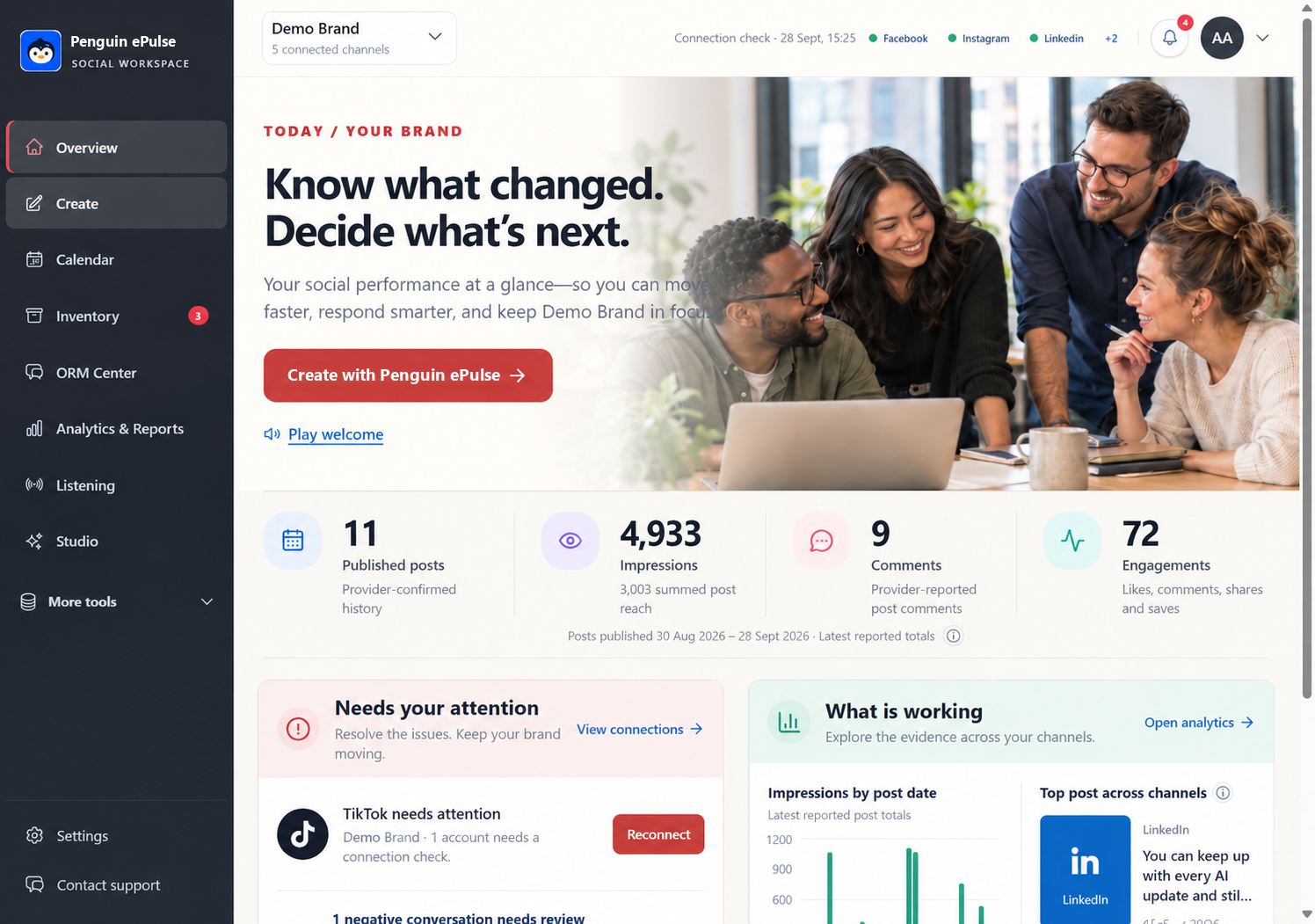
Where the Penguin ePulse features fit.
| Product surface | Role in this workflow |
|---|---|
| Create and Inventory | Prepare channel-specific drafts and keep working assets close to the content task. |
| Calendar | Review the planned content sequence and the account context before publishing. |
| AI Studio | Develop a working draft or explanation from available workspace context, with human review of the next action. |
Confirm the exact connected accounts, available actions and data before rollout. Research coverage depends on configured sources and provider access; some collection can carry provider costs. Human review and specialist handoffs follow your team's process.
Measure the decision, not just the activity.
| Measure to review | What the evidence should show |
|---|---|
| Brief completeness | Check whether the audience, objective, source claims and client decision are recorded before production. |
| Rework causes | Review revisions caused by missing context separately from normal creative refinement. |
| Publication accuracy | Sample the released account, asset and destination against the reviewed package. |
Set your baseline from a comparable period and record the source for each measure. These are evaluation criteria, not measured Penguin ePulse customer results. Use approved external records when the business outcome sits outside the social workspace.
Questions about agency social media content planning
Does this require a client approval portal?
No. Keep client review in the agency's established process and validate any required approval capability separately.
Can an agency assume every network format is supported?
No. Demonstrate the representative account, format and publishing action before rollout.
How should client claims be handled?
Ask for the supporting source and authorized review. Do not invent customer results or performance promises to complete a draft.
Sources and operating boundaries.
Validate account access, client boundaries and handoffs with representative users before rollout. The examples do not claim unrestricted white-labeling, automated routing or support for every channel.
- FTC: social endorsement disclosures — Guidance on disclosing relevant relationships in social endorsements.
External references support the information-handling or measurement context. They do not certify Penguin ePulse or independently verify its product capabilities.
Go deeper on the operating decisions.
More agency use cases.



See this workflow with your team's context.
Bring an anonymized example and the account or research source you need. Walk through the source, the next action and the review afterward. The demo should establish which parts fit your current setup and which require another system or specialist.